Introduction
A repeat block lets you draw a
partial threading or tie-up or
treadling and have it copied over
and over, automatically and
quickly, throughout your design.
Repeating a block is the basic
way you build patterns by hand
in WeaveMaker. The size and
extent of the repeat are under
your control, and you can use as
many different repeat blocks as
you wish within a single design.
If you already know about
blocks and want detailed infor-mation
on using the block tools,
you can skip ahead to Section 6: “BlockTools”. Examples of using
repeat blocks to build some
familiar patterns is given in “Using Repeat Blocks” section.
The 3 by 3 cell straight draw
threading illustrated below is an example of a block.

Such a block can be automatically
copied (by
WeaveMaker) to form the threading
illustrated below.
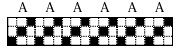
In fact, any rectangular array of
cells can be a block.
WeaveMaker lets you mark out
an area (using the marquee tool)
to be a block. This marking
persists until you dismiss the
block.
Repeat Block Example
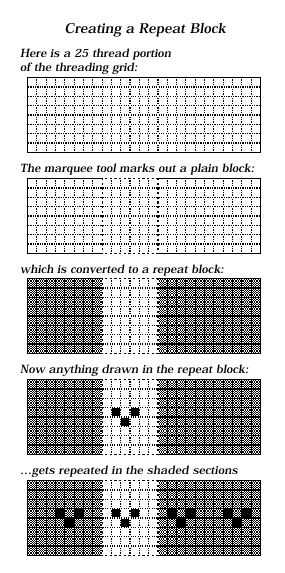
| The illustrations on the facing
page show a threading grid with
25 threads and 8 harnesses.
Part of the grid (6 threads wide)
is outlined with a dashed line
(second illustration) created with
the marquee tool.
The outlined area is the
block.
The plain block, as drawn by the
marquee tool, is then converted
into a repeat block (third illustration)
by clicking on the repeat
rectangle in the Tools window.
The appearance of the gray
“wings” alongside the marquee is
confirmation that this is a repeat
block. In the gray area,
WeaveMaker repeats everything
done within the block.
Select the pencil tool and move it
over the grid. You’ll find it has
three properties:
- Clicking on a square in the
block area fills in the square.
- Filled-in squares within the
block are repeated to the edge
of the grid (that is, throughout
the shaded area in the above
figure).
- Clicking again in any filled-in
square erases it and its
copies.
Suppose that with this pencil
you mark three cells in the block
(the ones which are blackened in
Here is a 25 thread portion
of the threading grid:
The marquee tool marks out a plain block:
which is converted to a repeat block:
Now anything drawn in the repeat block:
…gets repeated in the shaded sections
the fourth figure below). Notice that
the cell you clicked, and the
ones at regular intervals to
the right and left, are
blackened. This kind of
magical graph paper would
make drawing designs
quick, precise, and fun.
Any actions you take inside
the block are automatically
repeated throughout the
gray part of the grid.
|
 |
There are several variations
on the straight copying
illustrated here (the repeats
can be reflected in various
ways, or they can creep up
or down). These options
are taken up in detail in the
next section.
Please see "Basket Weave" and
"Houndstooth" for examples of using
blocks to create some
common fabric patterns.
|